How to set each timer
A switch inside the voice computer circuit board
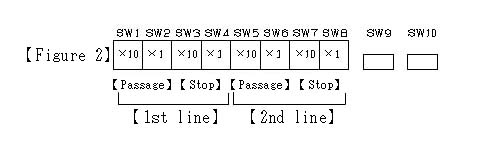
- How to set a timer for the approach broadcasting
- *A place for ten seconds, SW2, 4, 6, 8 are places for one second with SW1, 3, 5, 7.
- 1.The timer set of No.1 line
- Passage broadcasting is set with SW1 and SW2.
Be the place where a train approached as much as the home front 50m, and set it to finish broadcasting.
- Stop broadcasting is set with SW3 and SW4.
Be the place where a train approached as much as the home front 50m, and set it to finish broadcasting.
- 2.The timer set of No.2 line
- Passage broadcasting is set with SW5 and SW6.
Be the place where a train approached as much as the home front 5Om, and set it to finish broadcasting.
- Stop broadcasting is set with SW7 and SW8.
Be the place where a train approached as much as the home front 5Om, and set it to finish broadcasting.
To the previous page
To the next page
It is returned to the product guidance.