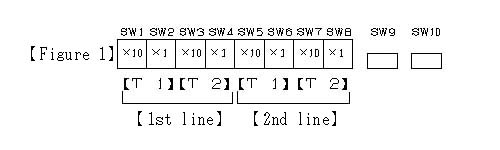
How to set each timer
A switch inside the automatic control circuit board
1.The way of setting it at present of the time
It does with SW9 of ( the figure 1 ) and SW10.
-1. When SW10 is pushed first, the following menu comes out in the LCD indication vessel.
1.POWER ON/ off
2.At night, volume
3.TIME
-2. The next indication comes out if 3 is chosen with SW9 and next SW10 is pushed.
[00:00-00:00]
-3. Put a number with SW9.
Push SW10, and move a cursor, and put a number in the same method to 0 at the end, and set it if you come in.
-4. Push SW10 after you finish the above set. It is set completion.
Time is indicated on the bottom right of the LCD indication vessel at present.
To the previous page
To the next page
It is returned to the product guidance.