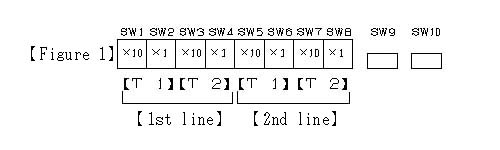
A switch inside the automatic control circuit board
How to set day and night volume
It does with SW9 of ( the figure 1 ) and SW10.
-1. When SW10 is pushed in the same way, the following menu comes out in the LCD indication vessel.
1.POWER ON/ off
2.At night, volume
3.TIME
-2. The next indication comes out if 2 is chosen with SW9 and next SW10 is pushed.
* At night, volume *
[00:00-00:00]
-3. Push SW10, and move a cursor to the first 0, and put a number with SW9.
Put a number in the same method to 0 at the end, and set it if you come in.
-4. Push SW10 after you finish the above set.
It is set completion.
Time is indicated on the bottom right of the LCD indication vessel at present.